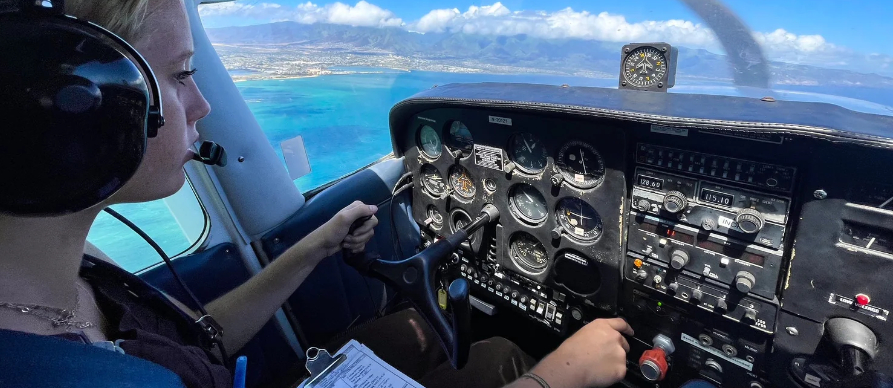
A PIREP (or Pilot Weather Report) is a report made by a pilot in flight, providing real-time information about the current weather conditions, flight experiences, and any hazards or unusual situations encountered.
Pilots can report any observation, good or bad, to assist other pilots with flight planning and preparation. If conditions were forecasted to occur but not encountered, a pilot can also report the observed condition.
These reports will help other pilots, air traffic controllers and will help the NWS verify forecast products and create more accurate products for the aviation community as they offer firsthand data about conditions that might not be detected by weather radar or forecasting tools.
As a pilot, filing PIREPs is of utmost importance. These reports serve as a vital means of transmitting crucial weather information to fellow pilots, allowing them to make informed decisions about their flight plans. In certain situations, timely filing of a PIREP can be the difference between life and death.
Not only do PIREPS help to improve situational awareness for other pilots and assist in the overall safety of the airspace, but other pilots appreciate pertinent information being passed along that allows them to incorporate actual weather conditions into their flight planning and in-flight processes.
Filing a PIREP
A PIREP is prepared using a prescribed format (see below).
Elements for all PIREPs are:
- Message type
- Flight path or location (e.g., specific coordinates or altitude)
- Time
- Altitude (or Flight Level)
- Aircraft Type
and at least one other element to describe the reported phenomena such as:
- Weather conditions (e.g., turbulence, icing, visibility, cloud coverage)
- Aircraft performance (e.g., unusual engine performance, turbulence felt, or any other specific events)
- Hazards or significant observations (e.g., thunderstorms, wind shear, volcanic ash etc.)
- The other elements are omitted when no data is reported
Distance for visibility is in statute miles and all other distances are in nautical miles. Time is reported in Coordinated Universal Time.
During a flight, you are able to file a PIREP to either the ATC facility that you are in contact with (if they have time to do so) or you may request to switch over to a Flight Service Station (FSS) frequency to file the report.
It is advisable that you have a copy of the PIREP form to hand and is filled out with the report you wish to file. The PIREP can be found in the FAA Chart Supplement publications, in the scratch pad area of Foreflight as a template and may also be downloaded here.
In-flight if you are currently receiving flight following services from ATC (or if you’re on a IFR flight) contact ATC and request to leave the current frequency in order to switch over to the Flight Service Station in order to file a PIREP.
FAA air traffic facilities are required to solicit PIREPs when the following conditions are reported or forecast: ceilings at or below 5,000 feet; visibility at or below 5 miles (surface or aloft); thunderstorms and related phenomena; icing of light degree or greater; turbulence of moderate degree or greater; wind shear and reported or forecast volcanic ash clouds. Pilots are urged to cooperate and promptly volunteer reports of these conditions and other atmospheric data such as: cloud bases, tops and layers; flight visibility; precipitation; visibility restrictions such as haze, smoke and dust; wind at altitude; and temperature aloft.
PIREPs should be given to the ground facility with which communications are established; i.e.,
- FSS,
- ARTCC,
- Terminal ATC.
One of the primary duties of the Inflight position is to serve as a collection point for the exchange of PIREPs with en route aircraft.
If pilots are not able to make PIREPs by radio, reporting upon landing of the inflight conditions encountered to the nearest FSS or Weather Forecast Office will be helpful. Some of the uses made of the reports are:
PIREP Form
The PIREP form 7110-2 follows a specific format and should be followed wherever possible.
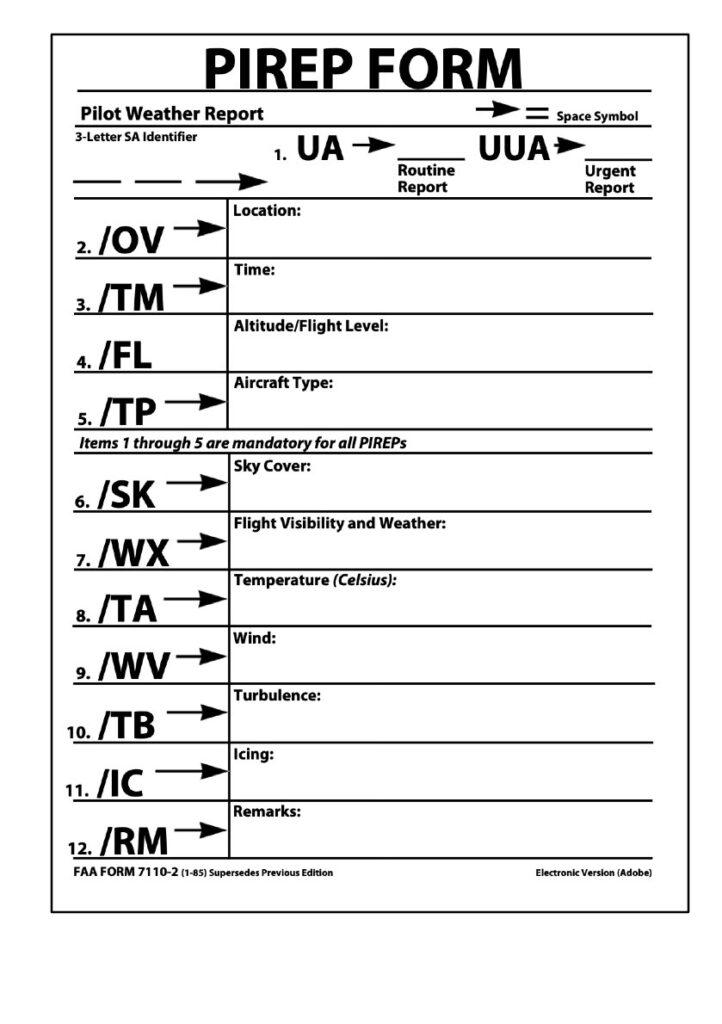
1. UA – Routine PIREP / UUA – Urgent PIREP
2. /OV – Location: Use Airport or NAVAID identifiers only.
- Location can be reported as a single fix, radial DME, or a route segment (Fix- Fix)
Examples: /OV LAX, /OV LAX-SLI120005, /OV PDZ-PSP.
3. /TM – Time: When conditions occurred or were encountered.
- Use 4 digits in UTC.
Examples: /TM 1645, /TM 0915
4. /FL – Altitude/Flight Level
- Use 3 digits for hundreds of feet. If not known, use UNKN.
Examples: /FL095, /FL310, /FLUNKN
5. /TP – Type aircraft: Required if reporting Turbulence or Icing
- No more than 4 characters, use UNKN if the type is not known.
Examples: /TP P28A, /TP RV8, /TP B738, /TP UNKN
6. /SK – Sky Condition/Cloud layers:
- Report cloud coverage using contractions: FEW, SCT, BKN, OVC, SKC
- Report bases in hundreds of feet: BKN005, SCT015, OVC200
- If bases are unknown, use UNKN
- Report cloud tops in hundreds of feet: TOP120
Examples: /SK BKN035, /SK SCT UNKN-TOP125, /SK OVC095-TOP125/ SKC
7. /WX – Weather: Flight visibility is always reported first. Append FV reported with SM.
- Report visibility using 2 digits: FV01SM, FV10SM
- Unrestricted visibility use FV99SM.
- Use standard weather contractions e.g.: RA, SH, TS, HZ, FG, -, +
Examples: /WX FV01SM +SHRA, /WX FV10 SM -RA BR.
8. /TA – Air temperature (Celsius): Required when reporting icing
- 2 digits, unless below zero, then prefix digits with M.
Examples:/TA 15, /TA 04 /TA M06
9. /WV – Wind: Direction in 3 digits, speed in 3 or 4 digits, followed by KT.
Examples: /WV 270045KT, /WV 080110KT
10. /TB – Turbulence:
- Report intensity using LGT, MOD, SEV, or EXTRM
- Report duration using INTMT, OCNL or CONS when reported by pilot.
- Report type using CAT or CHOP when reported by pilot.
- Include altitude only if different from /FL.
- Use ABV or BLO when limits are not defined.
- Use NEG if turbulence is not encountered.
Examples: /TB OCNL MOD, /TB LGT CHOP, /LGT 060, /TB MOD BLO 090, / TB NEG
11. /IC – Icing:
- Report intensity using TRACE, LGT, MOD or SEV
- Report type using RIME,CLR, or MX
- Include altitude only if different than /FL.
- Use NEG if icing not encountered.
Examples: /IC LGT-MOD RIME, /IC SEV CLR 028-045, /IC NEG
12. /RM – Remarks: Use to report phenomena that does not fit in any other field.
- Report the most hazardous element first.
- Name of geographic location from /OV field fix.
Examples: /RM LLWS +/-15KT SFC-003 DURC RWY22 JFK
/RM MTN WAVE, /RM DURC, /RM DURD, /RM MULLAN PASS
/RM BA RWY 02L BA MEDIUM TO POOR 3IN DRY SN OVER COMPACTED
For more detailed information on PIREPS, users can refer to the current version of the Aviation Weather Handbook, FAA-H-8083-28.
Advising ATC of frequency change to FSS
If you are under the control of, or receiving services from an ATC facility you will need to request / advise that you wish to leave the frequency to make a Pilot Report. The controller will usually approve the request and tell you to check back in when you return to the frequency.
Example:
Pilot: “Approach Warrior 276ND, requesting to temporarily leave the frequency to file a PIREP with Flight Service”
Approach: “Request granted, please check back in when you return”
Contacting Flight Service Station
Tip: Make a note of your current ATC frequency before leaving it.
Tune your VHF radio to the desired FSS frequency. The Flight Service frequencies (often 122.2, 122.4, or 122.6) can be found on your sectional chart, typically near VOR station information. Some FSS stations can be contacted through a VOR’s navigation signal (indicated by “R” next to the frequency, such as 122.1R).
When calling, state the FSS name (e.g., “Bridgeport Radio”), your aircraft identification, location, and the frequencies you are using for transmission and reception.
Example: “Bridgeport Radio, Warrior 276ND, 10 miles south of the Gardner VOR, receiving 122.1R, transmitting on 122.1”.
You will need to have your PIREP ready to read off to the FSS. You should follow the standard PIREP format using the form (above).
When you have filed your PIREP – tune back to the ATC facility and information the controller that you are back in the frequency!
Filing a PIREP with ATC
Many pilots believe that when you are providing a pilot report that you need to follow a strict format. This often makes pilots hesitant to give pilot reports because they don’t know the exact order – or they don’t have all the information.
It is better to pass on the information that you do have in order to benefit others. ATC will take whatever you’ve got.
- It’s not always necessary to go to flight service.
- If ATC has time and are not too busy – you can give it directly to them. (It’s always good to ask if they have time for a PIREP).
- Be short and concise, and they will take that information so it can help all the pilots operating in the area.
- Don’t feel that you have to format it exactly in the perfect order that it’s shown on a PIREP form.
Example: – If you’re flying at 5,000 feet and you’re getting moderate turbulence, just report in and let them know the conditions, “Approach, N267ND, level here at 5,000 – moderate turbulence.
The ATC controller will write that information all down on the PIREP form.
Don’t feel like you need to give ATC the time or your aircraft type, if you have established two way radio contact – they already know!
Just tell them the conditions you encounter and they will pass it along, formatted in the way it needs to be. You can follow the PIREP form if you want, but providing the pertinent information is the most important thing!
When you offer this type of information you may hear back from a controller for more information.
For example they may want to hear the outside air temperature so they can provide this to the meteorologists so they can start changing their icing models for forecasting. It also gives ATC an idea of what the temperature is for better planning for aircraft. For example if the air temperature is near freezing they can start descending aircraft in order get them into warmer air.
Even reporting that sky conditions clear and smooth is a good thing for ATC to know because they want to know where the closest area of clear VFR conditions are to help that pilot get to VFR conditions.
When it comes to PIREPS by providing information about current weather conditions you’re giving ATC and other pilots information they will be encountering that they will want to know.
If you’re not gonna give the information just because of the format, that information cannot be passed on to those who need it
So remember, it’s not about the format, it’s about the information and passing it along to those who need it.